vsftp: 1.2.0 vsftp配置说明
04 Nov 2015
1. 配置研究(/etc/vsftpd/vsftpd.conf)
1.1 daemon配置说明
1.1.1 配置项listen=YES/NO说明
# When "listen" directive is enabled, vsftpd runs in standalone mode and
# listens on IPv4 sockets. This directive cannot be used in conjunction
# with the listen_ipv6 directive.
当使用”YES”配置时,listen=YES
ps aux|grep vsftpd
root       3392  0.0  0.0  52112   796 ?        Ss   17:31   0:00 /usr/sbin/vsftpd /etc/vsftpd/vsftpd.conf
# 现在是运行的standalone模式(独立运行模式)
当使用”NO”配置时,listen=NO
# 此时以standalone启动服务报错
service vsftpd restart
Shutting down vsftpd:                                      [  OK  ]
Starting vsftpd for vsftpd: 500 OOPS: vsftpd: not configured for standalone, must be started from inetd
                                                           [FAILED]
1.1.2 安装xinetd来接管vsftpd服务
yum install xinetd -y
vim /etc/xinetd.conf
## 最后添加以下内容
# service ftp
# {
#         socket_type             = stream
#         wait                    = no
#         user                    = root
#         server                  = /usr/sbin/vsftpd      # 指定程序主命令
#         log_on_success          += DURATION USERID
#         log_on_failure          += USERID
#         nice                    = 10
#         disable                 = no
# }

# 启动xinetd服务并检查vsftpd状态
service xinetd start
service vsftpd status
# vsftpd is stopped
service xinetd status
# xinetd (pid  3710) is running...


netstat -nltp |grep 21
# tcp    0   0 :::21                 :::*                    LISTEN      3710/xinetd
# 说明xinetd已经接替vsftpd这个daemon来监听21端口,可以测试下访问ftp,成功
1.1.3 配置项local_enable
控制本地用户是否可用于登录vsftp,默认是NO。如果启用(YES),则/etc/passwd文件(或者PAM配置中其他的文件)中定义的用户可用于登录vsftp。 非匿名登录,包含虚拟用户登录,必须将这个选项配置为YES。
1.1.4 日志相关配置
## 日志开启控制配置
# 默认为NO,当启用此选项时,所有对FTP的请求和响应都会被记录到日志中,前提是不能启用xferlog_std_format。适用于DEBUG
log_ftp_protocol=YES

# 默认为NO,当启用此选项时,会把日志格式转换为标准的xferlog格式,适用于wu-ftpd。默认日志会储存到/var/log/xferlog。
xferlog_std_format=NO

# 默认为NO,当启用此选项时,文件的上传和下载会被记录到日志。默认日志会储存到/var/log/vsftpd.log。
xferlog_enable=YES

# 默认为NO,当启用此选项时,vsftpd格式和wu-ftpd格式的日志会并行分别记录到/var/log/vsftpd.log和/var/log/xferlog中。
dual_log_enable=NO

## 日志储存位置配置
# 默认为NO,当启用此选项时,原本记录到/var/log/vsftpd.log的日志会存到系统日志中。
syslog_enable=NO

# 默认为/var/log/vsftpd.log,用于配置vsftpd格式的日志的储存位置。生效前提是xferlog_enable为YES,而xferlog_std_format为NO,或者dual_log_enable为YES。如果syslog_enable为YES,vsftpd的输出会输出到系统日志,此选项配置的日志路径不会生效。
vsftpd_log_file=/var/log/vsftpd.log

# 默认为/var/log/xferlog,用于配置wu-ftpd格式的日志的储存位置。生效前提是xferlog_enable为YES,同时xferlog_std_format也为YES,或者dual_log_enable为YES。
xferlog_file=/var/log/xferlog
日志文件不是在进程启动时创建,而是在有请求时才会创建。
1.2 访问控制
1.2.1 配置项tcp_wrappers=YES/NO说明
If enabled, and vsftpd was compiled with tcp_wrappers support, incoming connections will be fed through tcp_wrappers access control. Furthermore, there is a mechanism for per-IP based configuration. If tcp_wrappers sets the VSFTPD_LOAD_CONF environment variable, then the vsftpd session will try and load the vsftpd configuration file specified in this variable.
是否启动tcp_wrappers来帮助vsftpd过滤IP,Default: NO
1.2.2 开启tcp_wrappers
首先开启配置: tcp_wrappers=YES
# 配置hosts.deny和hosts.allow
vim /etc/hosts.deny
****************************
vsftpd: All
## 拒绝所有
****************************
vim /etc/hosts.allow
****************************
vsftpd:172.16.2.128
## 只允许172.16.2.128的ip访问
****************************
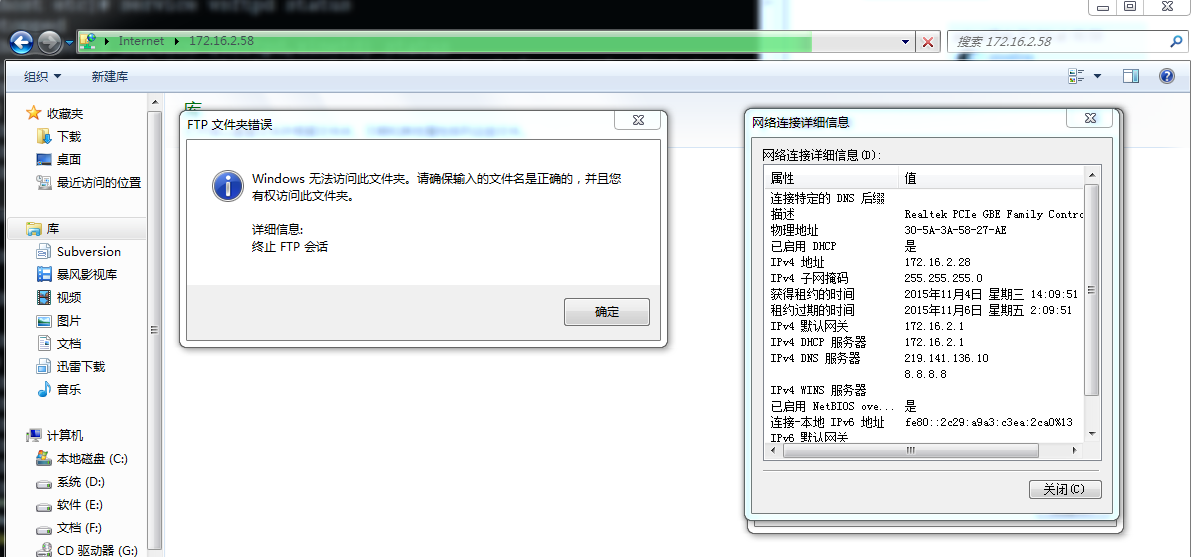
# 试试让172.16.2.28ip通过
vim /etc/hosts.allow
****************************
vsftpd:172.16.2.28
# 只允许172.16.2.28的ip访问
****************************
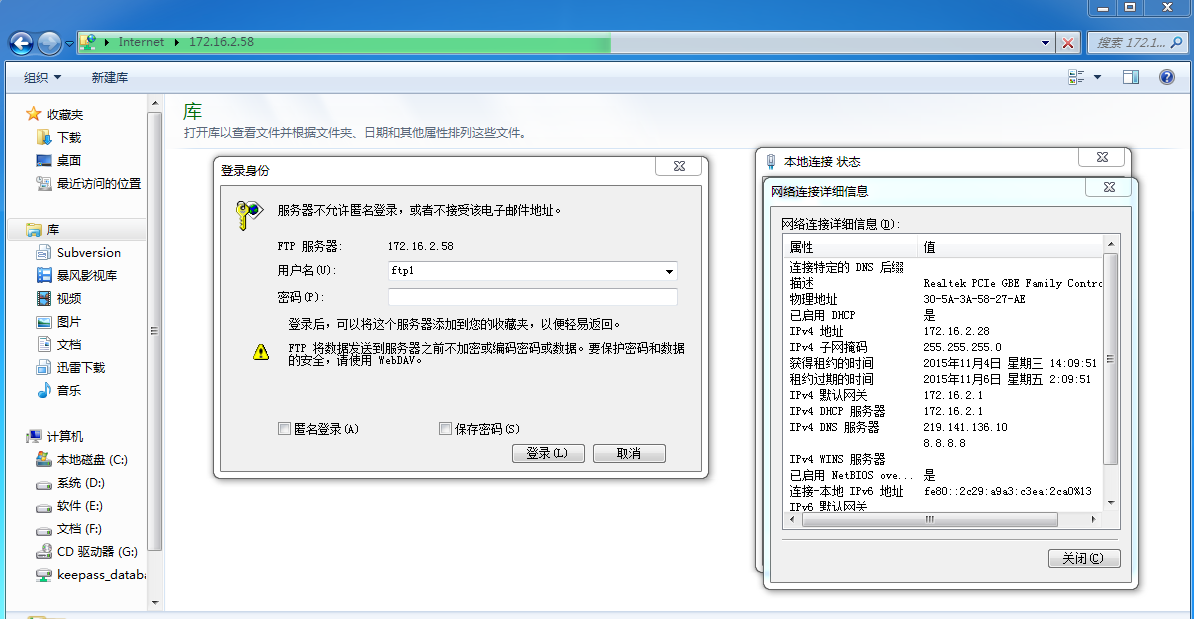
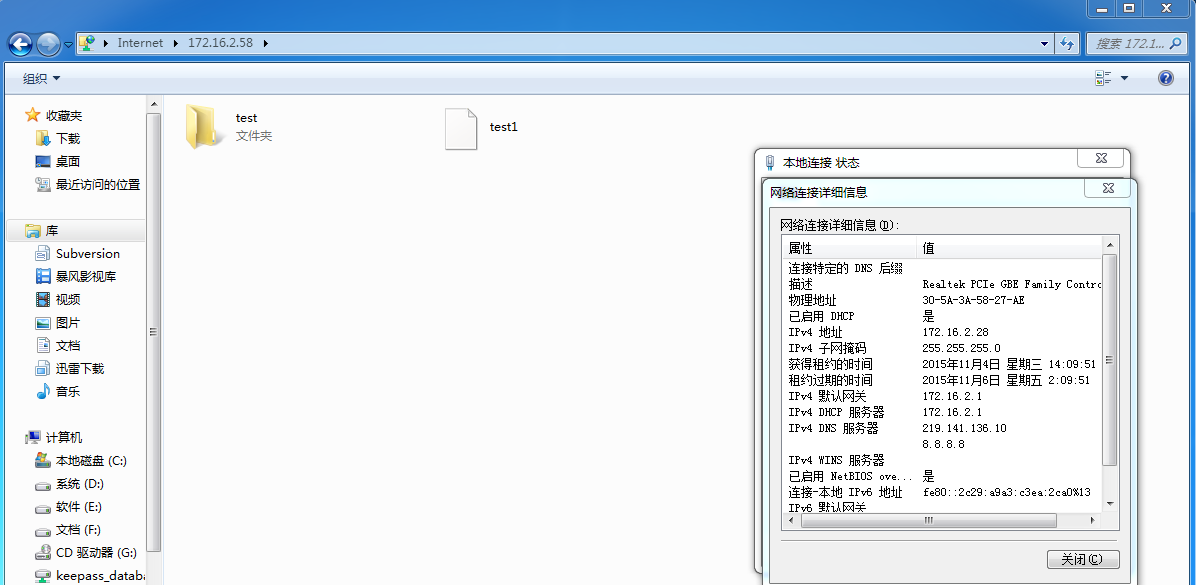
成功登录,而且,hosts.allow还可以设置多个ip,用空格隔开即可。
让我们设想一下,如果可以将ip和机器的mac地址绑定(switch设备可以将mac地址和网口绑定),然后用ip来控制访问,这样就可以达到,只允许同一个网段不同ip访问vsftp的效果。再往深层次考虑,我们设置两台vsftp服务器,用了上面的mac绑定ip控制以后,一台vsftp只能写入,一台只能读取,然后做个shell脚本用root用户从写vsftp->读vsftp,这样就形成了一种内外网机制,软件或文档只可以内流。当然首先你要先部署内外网隔离和其他安全项。
1.3 操作命令控制
1.3.1 配置cmds_allowed或cmds_denied
cmds_allowed
This options specifies a comma separated list of allowed FTP commands (post login. USER, PASS and QUIT and others are always allowed pre-login). Other commands are rejected. This is a powerful method of really locking down an FTP server. Example: cmds_allowed=PASV,RETR,QUIT
Default: (none)
cmds_denied
This options specifies a comma separated list of denied FTP commands (post login. USER, PASS, QUIT and others are always allowed pre-login). If a command appears on both this and cmds_allowed then the denial takes precedence. (Added in v2.1.0).
Default: (none)
1.3.2 配置cmds_denied=……保留cmds_allowed为默认
vim /etc/vsftpd/vsftpd.conf
*************************************
cmds_denied=DELE,RMD,RNFR,RNTO
# cmd说明,见最后ftp命令表,此处限制了ftp用户无法实行删除文件、删除目录和重命名操作
*************************************
service xinetd restart
无法删除文件和目录
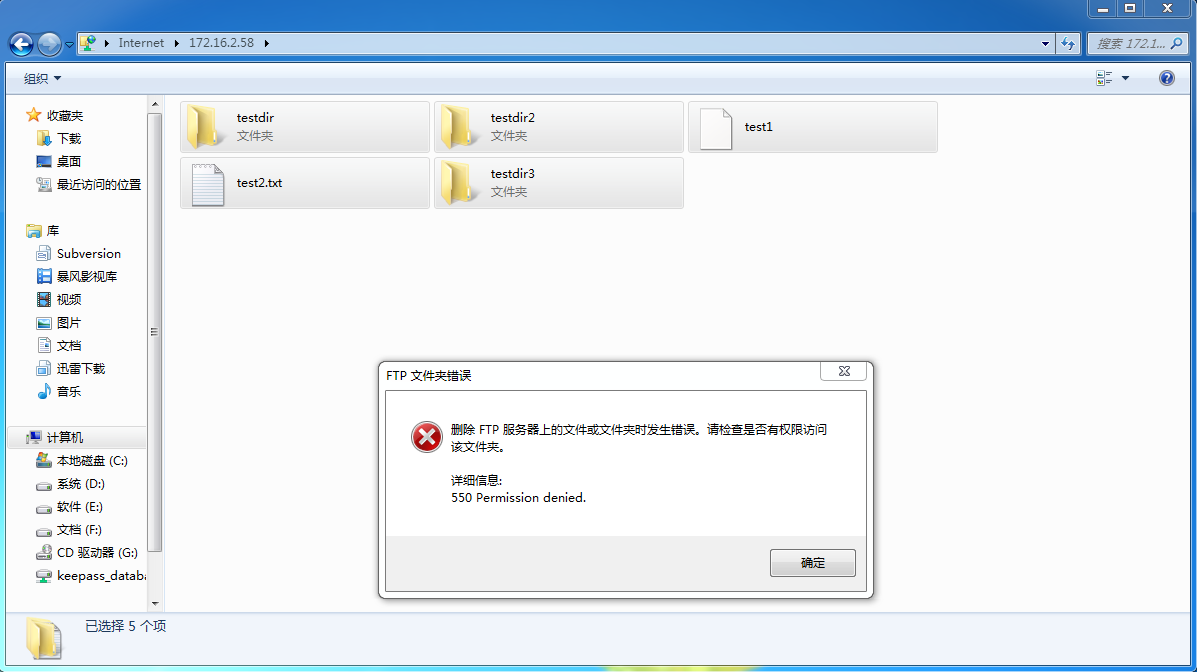
无法重命名文档
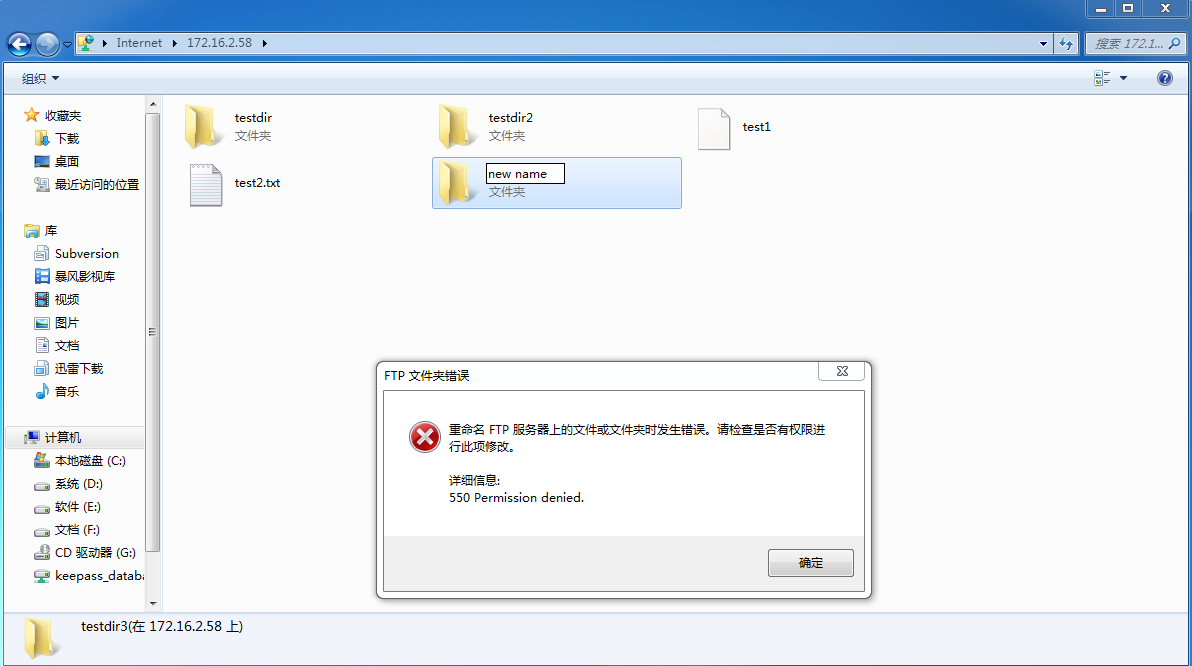
例外,cmd上ftp可以删除空目录

1.4 操作命令限制2 - 可写和可下载
1.4.1 配置write_enable和download_enable
write_enable
This controls whether any FTP commands which change the filesystem are allowed or not. These commands are: STOR, DELE, RNFR, RNTO, MKD, RMD, APPE and SITE.
Default: NO
download_enable
If set to NO, all download requests will give permission denied.
Default: YES
ps:配置很简单,不演示
附:网摘所有cmds_allowd和cmds_denied相关的ftp命令缩写
List of raw FTP commands
(Warning: this is a technical document, not necessary for most FTP use.)
Note that commands marked with a * are not implemented in a number of FTP servers.
Common commands
* ABOR - abort a file transfer
* CWD - change working directory
* DELE - delete a remote file
* LIST - list remote files
* MDTM - return the modification time of a file
* MKD - make a remote directory
* NLST - name list of remote directory
* PASS - send password
* PASV - enter passive mode
* PORT - open a data port
* PWD - print working directory
* QUIT - terminate the connection
* RETR - retrieve a remote file
* RMD - remove a remote directory
* RNFR - rename from
* RNTO - rename to
* SITE - site-specific commands
* SIZE - return the size of a file
* STOR - store a file on the remote host
* TYPE - set transfer type
* USER - send username
Less common commands
* ACCT* - send account information
* APPE - append to a remote file
* CDUP - CWD to the parent of the current directory
* HELP - return help on using the server
* MODE - set transfer mode
* NOOP - do nothing
* REIN* - reinitialize the connection
* STAT - return server status
* STOU - store a file uniquely
* STRU - set file transfer structure
* SYST - return system type

ABOR
Syntax: ABOR
Aborts a file transfer currently in progress.
ACCT*
Syntax: ACCT account-info
This command is used to send account information on systems that require it. Typically sent after a PASS command.
ALLO
Syntax: ALLO size [R max-record-size]
Allocates sufficient storage space to receive a file. If the maximum size of a record also needs to be known, that is sent as a second numeric parameter following a space, the capital letter "R", and another space.
APPE
Syntax: APPE remote-filename
Append data to the end of a file on the remote host. If the file does not already exist, it is created. This command must be preceded by a PORT orPASV command so that the server knows where to receive data from.
CDUP
Syntax: CDUP
Makes the parent of the current directory be the current directory.
CWD
Syntax: CWD remote-directory
Makes the given directory be the current directory on the remote host.
DELE
Syntax: DELE remote-filename
Deletes the given file on the remote host.
HELP
Syntax: HELP [command]
If a command is given, returns help on that command; otherwise, returns general help for the FTP server (usually a list of supported commands).
LIST
Syntax: LIST [remote-filespec]
If remote-filespec refers to a file, sends information about that file. If remote-filespec refers to a directory, sends information about each file in that directory. remote-filespec defaults to the current directory. This command must be preceded by a PORT or PASV command.
MDTM
Syntax: MDTM remote-filename
Returns the last-modified time of the given file on the remote host in the format "YYYYMMDDhhmmss": YYYY is the four-digit year, MM is the month from 01 to 12, DD is the day of the month from 01 to 31, hh is the hour from 00 to 23, mm is the minute from 00 to 59, and ss is the second from 00 to 59.
MKD
Syntax: MKD remote-directory
Creates the named directory on the remote host.
MODE
Syntax: MODE mode-character
Sets the transfer mode to one of:
* S - Stream
* B - Block
* C - Compressed
The default mode is Stream.
NLST
Syntax: NLST [remote-directory]
Returns a list of filenames in the given directory (defaulting to the current directory), with no other information. Must be preceded by a PORT or PASVcommand.
NOOP
Syntax: NOOP
Does nothing except return a response.
PASS
Syntax: PASS password
After sending the USER command, send this command to complete the login process. (Note, however, that an ACCT command may have to be used on some systems.)
PASV
Syntax: PASV
Tells the server to enter "passive mode". In passive mode, the server will wait for the client to establish a connection with it rather than attempting to connect to a client-specified port. The server will respond with the address of the port it is listening on, with a message like:
227 Entering Passive Mode (a1,a2,a3,a4,p1,p2)
where a1.a2.a3.a4 is the IP address and p1*256+p2 is the port number.
PORT
Syntax: PORT a1,a2,a3,a4,p1,p2
Specifies the host and port to which the server should connect for the next file transfer. This is interpreted as IP address a1.a2.a3.a4, portp1*256+p2.
PWD
Syntax: PWD
Returns the name of the current directory on the remote host.
QUIT
Syntax: QUIT
Terminates the command connection.
REIN*
Syntax: REIN
Reinitializes the command connection - cancels the current user/password/account information. Should be followed by a USER command for another login.
REST
Syntax: REST position
Sets the point at which a file transfer should start; useful for resuming interrupted transfers. For nonstructured files, this is simply a decimal number. This command must immediately precede a data transfer command (RETR or STOR only); i.e. it must come after any PORT or PASV command.
RETR
Syntax: RETR remote-filename
Begins transmission of a file from the remote host. Must be preceded by either a PORT command or a PASV command to indicate where the server should send data.
RMD
Syntax: RMD remote-directory
Deletes the named directory on the remote host.
RNFR
Syntax: RNFR from-filename
Used when renaming a file. Use this command to specify the file to be renamed; follow it with an RNTO command to specify the new name for the file.
RNTO
Syntax: RNTO to-filename
Used when renaming a file. After sending an RNFR command to specify the file to rename, send this command to specify the new name for the file.
SITE*
Syntax: SITE site-specific-command
Executes a site-specific command.
SIZE
Syntax: SIZE remote-filename
Returns the size of the remote file as a decimal number.
STAT
Syntax: STAT [remote-filespec]
If invoked without parameters, returns general status information about the FTP server process. If a parameter is given, acts like the LIST command, except that data is sent over the control connection (no PORT or PASV command is required).
STOR
Syntax: STOR remote-filename
Begins transmission of a file to the remote site. Must be preceded by either a PORT command or a PASV command so the server knows where to accept data from.
STOU
Syntax: STOU
Begins transmission of a file to the remote site; the remote filename will be unique in the current directory. The response from the server will include the filename.
STRU
Syntax: STRU structure-character
Sets the file structure for transfer to one of:
* F - File (no structure)
* R - Record structure
* P - Page structure
The default structure is File.
SYST
Syntax: SYST
Returns a word identifying the system, the word "Type:", and the default transfer type (as would be set by the TYPE command). For example: UNIX Type: L8
TYPE
Syntax: TYPE type-character [second-type-character]
Sets the type of file to be transferred. type-character can be any of:
* A - ASCII text
* E - EBCDIC text
* I - image (binary data)
* L - local format
For A and E, the second-type-character specifies how the text should be interpreted. It can be:
* N - Non-print (not destined for printing). This is the default if second-type-character is omitted.
* T - Telnet format control (<CR>, <FF>, etc.)
* C - ASA Carriage Control
For L, the second-type-character specifies the number of bits per byte on the local system, and may not be omitted.
USER
Syntax: USER username
Send this command to begin the login process. username should be a valid username on the system, or "anonymous" to initiate an anonymous login.